DISCLAIMER:
I am not a programmer and not a linuxoid, but only a copy-paster-enthusiast who shares what he could figure out. Therefore, it is possible that knowledgeable experts may find some points or formulations incorrect or ridiculous.

The submission of this material assumes that you have a basic level of knowledge of Liquidsoap.
This example is relevant for Ubuntu 22.04 and Liquidsoap version 2.2.0, in 2.1.4 - the code does not work!
Anyway, the following articles and tutorials will help you figure it out:
Creating a 24/7 stream(Liquidsoap)
Creating a 24/7 stream part 2(Liquidsoap)
How the latest updates works on Mikulski_Radio
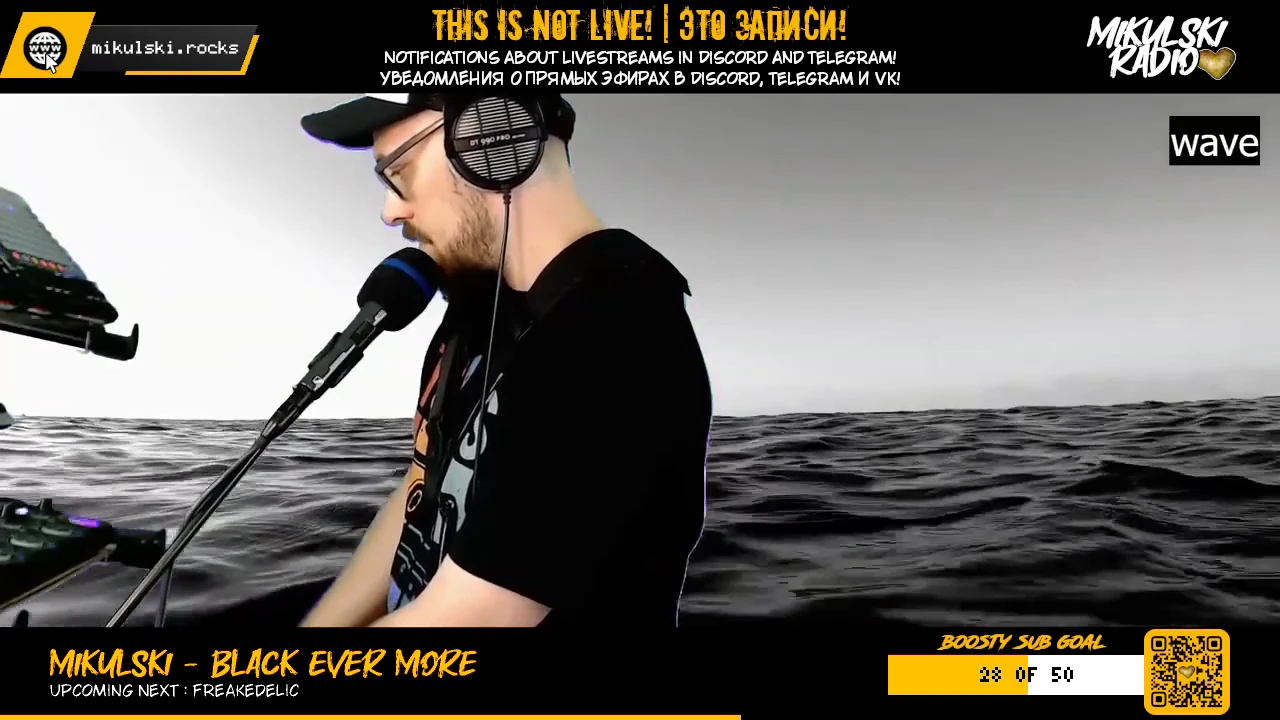
Well, I continue to “close gestalts”: to implement ideas that came at the dawn of the formation of Mikulski_Radio. Quite recently, it turned out to switch sources from a playlist to a remote stream from OBS, and now I have managed to make a goal widget. Not so elegant, but it’s works.
As I mentioned in one of the first articles on Liquidsoap, it does not provide the ability to draw OBS-widgets, since there is no built-in browser. Therefore, it is impossible to add all the alerts and goals that have become familiar to the reqular streams.
However, after it became clear, using the example of playback progress, that it was possible to draw simple rectangles in real time, I immediately came to the idea that it would be possible to draw my own widget. However, it remained unclear how to automate the process of obtaining data, so as not to drive them into the parameters manually. Especially in cases when there is no official API for the service from which you need to get the necessary information.
Web parsing
So that you understand how much I don’t understand anything about programming: until recently I thought that if the operating system doesn’t have a graphical shell, then all the delights of using a regular web browser are closed. Of course, it was obvious that some kind of communication with a web resource could be configured in the form of an exchange of requests. But imagine my surprise when I managed to take a screenshot of the page remotely in just a few revisions of the script, and then also log in to my account by entering my username and password!
That’s when I thought that since Boosty doesn’t have a public API, then I can take the current number of subscribers directly from my Boosty page.
In the screenshot example, it was the puppeteer library for nodejs. But since it is quite voracious in resources, I had to look for other more lightweight options. After going through several repositories, I settled on the unirest + cheerio bundle:
npm i unirest
npm i cheerio
const unirest = require("unirest");
const cheerio = require("cheerio");
const getData = async() => {
try{
const response = await unirest.get("<the address of the page to be parsed from>")
const $ = cheerio.load(response.body);
const selector = $('<a selector is inserted here>').text();
console.log(selector);
}
catch(e)
{
console.log(e);
}
}
getData(); To pick up information from a specific area of the page, you need to copy it, the so-called css-selector: right-click in the place of interest -> explore -> copy -> copy selector.
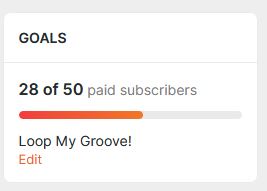
That’s where I decided to take the number of subscribers from.
Since the data here comes in the form of “28 of”, we had to cut off unnecessary characters using slice().
Here’s what happened in the end already with writing a number to a file:
const unirest = require("unirest");
    const cheerio = require("cheerio");

  const getData = async() => {
    try{
        const response = await unirest.get("https://boosty.to/mikulski")

    const $ = cheerio.load(response.body);
    const boosty_count = $('span.TargetItemCommon_collectedTextTarget_McKGZ:nth-child(1)').text();
    const boosty_subs = boosty_count.slice(0, 2);
       console.log("Current count of Boosty subs: " + boosty_subs);
            fs.writeFile(boosters_file, boosty_subs, (err) => {
        if (err) {
            console.log(err);
            }
        }
        )}

    catch(e)
    {
        console.log(e);
    }
    }
    getData();
All that remained was to wrap it all in a function and adjust the execution interval. But then I realized that due to regular requests, the ip of my server could easily get banned. After reading some recommendations on parsing, I found out that you should add Cookie collection to the parser, as well as User-Agent information – how my virtual browser appears to be for end resources and other nuances that still ultimately do not guarantee avoiding a ban.
But a little later I realized that I could link the execution of collecting the number of subscribers through my favorite watchFile: after all, there is already a telegram bot that connects to the DonationAlerts web socket and posts notifications about incoming donations- https://mikulski.rocks/ru/alerti-v-telegram-donationalerts/ (*only in russian, sorry).
Since my Boosty is linked to the DonationAlerts account, subscriptions on it are also perceived by the bot as if it is an incoming donation (to be honest, I just don’t know how to separate these events, so everything comes in a mass). In general, anyway, now there is an event to which I can cling, and therefore minimize the number of requests to the site.
Well, and then, according to the usual practice: I determined the file (count_trigger), which the parser will monitor and into which the telegram bot will make changes when the donation event arrives.
For further text output to the widget, I assigned the boot_count_txt file so that the number of subscribers also changed on the stream screen (in the form, “<n> out of 50”).
At the same time, just in case, I added the collection of cookies and the User_Agent reference (although I’m not sure I did everything right):
const boosters_file = './boosty_count';
fs.watchFile("./count_trigger", (curr, prev) => {
    const getData = async() => {
    try{
        const response = await unirest.get("https://boosty.to/mikulski")
        .jar(CookieJar)
        .header('User-Agent', 'Mozilla/5.0 (Windows NT 10.0; Win64; x64) AppleWebKit/537.36 (KHTML, like Gecko) Chrome/115.0.0.0 Safari/537.36');
    const $ = cheerio.load(response.body);
    const boosty_count = $('span.TargetItemCommon_collectedTextTarget_McKGZ:nth-child(1)').text();
    const boosty_subs = boosty_count.slice(0, 2);
       console.log("Current count of Boosty subs: " + boosty_subs);
            fs.writeFile(boosters_file, boosty_subs, (err) => {
        if (err) {
            console.log(err);
            }
            fs.writeFile(boosty_count_txt, `${boosty_subs} of 50`, (err) => {
        if (err) {
            console.log(err);
        }
    });
    });
    }
    catch(e)
    {
        console.log(e);
    }
    }
    getData();
});
Widget
It’s time to start drawing the widget directly. First, I drew a substrate, on top of which a progress rectangle will already “crawl”. Color, location, height and width.
s = mksafe(playlist("/path/to/videofiles"))

s = video.add_rectangle(color=0xffffff, x=50, y=315, height=30, width=280, s)
Next, I added reading the file (file.contents), which stores the number of subscribers, converting from string (this is the data that comes out when reading the file) to int (integer) and added a static number / goal (50) so that the rendering was in percentage ratio. The conversion is necessary so that the “draftsman” can correctly recognize the data of the width parameter for the rectangle. Otherwise, Liquidsoap will give an error and will not start.
boosty_count = string.to_int(file.contents("./boosty_count"))
s = video.add_rectangle(color=0xffffff, x=50, y=315, height=30, width=280, s)
s = video.add_rectangle(color=0xfcb900, x=50, y=315, height=30, width=(280*count / 50), s)
The problem is that the file.contents operator reads the file once at the start of Liquidsoap and that’s it. It no longer responds to file changes. The operator file.getter, which reads the file regularly, returns data no longer in the form of string, but in the form of {string} and when converted to string.to_int, it turns out {int}. The same thing happens if you write a function in which file.contents is nested. The draftsman, of course, refuses to accept it in this form.
In general, I spent a lot of time trying out various approaches and conversion methods. I haven’t paid attention to the ref operator yet – “creates a reference, i.e. a value that can be changed”. And after countless attempts, I was finally able to write a function. The point was to put the calculations for width in a separate variable, and not try to calculate everything inside video.add_rectangle:
n = ref(0)
def count_func()
n := (256*(string.to_int(file.contents("./boosty_count"))) / 50)
end
There is a nuance: to determine the data type for ref, it is necessary to enter the original value in parentheses as an argument. And after that, the ref itself will understand what it is required to store in itself: an integer, a float or a string. This has its own disadvantage: when running Liquidsoap, the widget will be reset to this initial value until the function is called to read the file.
n = ref(143)
def count_func()
n := (256*(string.to_int(file.contents("./boosty_count"))) / 50)
end
The function will be launched via file.watch, that is, it will be triggered by changes in the same boot_count file. Here’s how it all looks in general, with the text already superimposed (<n> out of 50):
s = mksafe(playlist("путь/к/видеофайлам"))

n = ref(143)
def count_func()
n := (256*(string.to_int(file.contents("./boosty_count"))) / 50)
end
file.watch("./boosty_count", count_func)

#widget
s = video.add_rectangle(color=0xffffff, x=888, y=655, height=40, width=256, s)
s = video.add_rectangle(color=0xfcb900, x=888, y=655, height=40, width=n, s)
#inner_text
boosty_count_txt = file.getter("./boosty_count_txt")
s = video.add_text(color=0x000000, x=980, y=667, size=15, boosty_count_txt, s)
Then a little shamanism with overlay and fitting and that’s what happened in the end: